Idea – Gift 100 MB to Friends andget 100 MB Free
Idea – Gift 100 MB to Friends and get 100 MB Free. Yes idea is offering an amazing offer where you need to gift data to your friend (a non-internet user)and your friend get the 100MB data if your friend uses minimum 20MB then you get the 100 MB data for 5 days from idea. So Hurry up and avail this offer !!
How to Get 100 MB Data by Sharing 100MB to Friend ?1)
First of all,Visit Activation Page http://i4all.ideacellular.com/welcome here
2) If you connected with idea internet then directly “Invite now” page get open else you need to verify your via OTP.
3) Now Verify your idea Mobile number via OTP.
4) Click on “Invite Now” and Enter the other Idea Mobile number and click on “Send my Invite Now”.
Note:- You need to send the data to a friend who not used idea internet for 90 days” From your idea sim.5) If your friend who’s been invited uses minimum 20MB free data within 30 days, the Idea company gift you a 100MBdata pack valid for 5 days.
So spread the joy and send this invite now !!
6) Many users got this SMS from idea about this..100MB do 100MBpao!! Muft me 100MB data gift kare aur paye 100 MB data idea ki taraf se.Dial
*756# aur abhi gift karein.Jankari 121200(Toll free) pe uplabdh
Sunday, 31 July 2016
How To Transfer WhatsApp Chats From One Phone To Another Phone
How To Transfer WhatsApp Chats From One Phone To Another Phone

Transfer WhatsApp Chats From One Phone To Another Phone
To transferring Whatsapp chats from one phone to another phone is a very easy process. You need to do these two following steps. Do Step 1 In your First Phone.


How To Resume IDM Broken file (100% Working)
Resume Internet download Manager Broken file: HelloTrickzapp.blogspot.com visitors Today I'm going to tell you how to Resume IDM Broken file. When you download any big file in IDM. its take time to complete but in this process many time files got broken or expired. well, now you don't worry about it because in this post we are talking about how to Resume IDM Broken file.

As You know internet download manager is popular download management tool to Download any type of file It will Help Us to Accelerate Our Download Speed Up to 5x Times Better, In IDM You Have Control Over Pausing, Resuming, Schedule. Here are some features of IDM


As You know internet download manager is popular download management tool to Download any type of file It will Help Us to Accelerate Our Download Speed Up to 5x Times Better, In IDM You Have Control Over Pausing, Resuming, Schedule. Here are some features of IDM
- Support for all popular browsers and applications:IDM Support All versions of Popular browsers like Google chrome, firefox, Mozilla, IE, AOL, MSN, Avant browser, Netscape and many more
- Easy Downloading with One Click: When you click on a download link in a browser, IDM will take over the download and IDM Popup window show you don't need to do anything special. IDM supports HTTP,FTP,HTTPS and MMS protocols.
- Advanced Browser Integration Feature: With Internet download manager you easily integrate IDM into any Internet application to take over downloads
- Supports many types of proxy servers: IDM works with Microsoft ISA, and FTP proxy servers.
Now Let's See How To Resume IDM Broken File But first of all, let's see some reasons of broken or expired files
The Download Broken or expired Because of The server has not responding, Your Internet connection has problems, You may Accidentally pause/cancel your download, Due to unexpected power loss and some other many reasons.
- Open your Internet Download Manager and right-click on the download file Then click on properties

- Copy the address from the address field and paste it into your browser address bar.

- Now click to download it.When IDM dialog window shows then click on download later.
- Then go to IDM Dashboard and get the new address by clicking its properties and copy the address from the address field.
- Paste the new address in broken file’s address field.
- Now click resume to continue your file downloading.
- DONE!
So Guys here is how to Resume IDM Broken file. Now you do not worry about broken or expired file problem in IDM. now you can solve these types of the problem by my little article. after this method if you face any problem to Resume IDM Broken File then feel free to comment blow I will reply your comment within 24 hours. if you like this method then please share This on facebook with your facebook friends
BlackBerry DTEK50: The World’s Most Secure Android SmartPhone

As we all know that security is more than essential for anyone who owns an android smartphone, as there are several ways to protect yourself, but a safe device is one of the most simplest way to keep your data saved. Hence, BlackBerry launched its second Android smartphone dubbed as DTEK50TM the world’s most secure phone.
Intel’s Multi-OS Engine Lets You Develop Apps For Android And iOS

The tech giant Intel announced a cross-platform that allows developers to create applications which are compatible with Android and automatically it can also be exported for the iOS as well. As this is the Multi-OS engine, which should speed up the work of the developers.
Intel’s Multi-OS Engine Lets You Develop Apps For Android And iOS
It is very common for an application to be released for iOS but little difficult for the Android, as a recent case was the Prisma, which took a month to get to the Android users, but if we notice the same for the iOS then we may notice that there are many interesting apps which are only available to the iOS users only. However, we should not forget that what is Android and how beyond you can go with Android. But, soon this may change with a new cross-platform development tool by Intel.
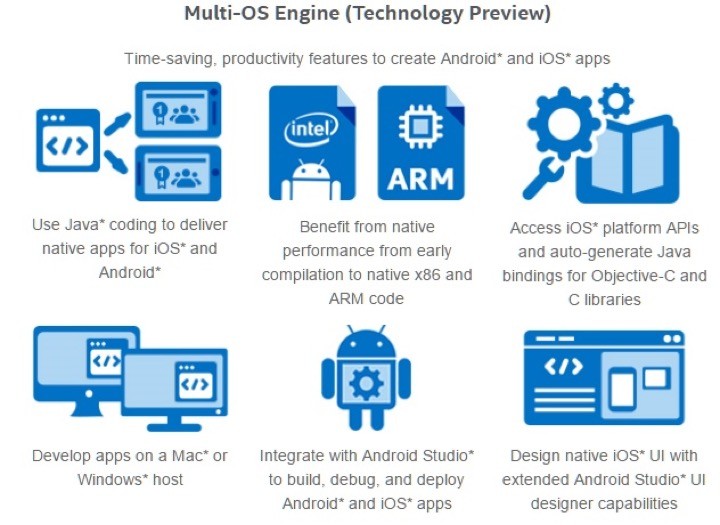
Yes, Intel’s Multi-OS Engine is a platform that Intel introduced to the world and came forward to liberate programmers the difficult task of knowing several programming languages for mobile devices. Based on Java which allows the applications to be created in a generic way and only at the end can also be converted to Swift, the new Apple programming language to create apps for iOS.

Thus, it avoids the need to have two teams to develop applications, each focused on a programming language or in another case, have the same team at different times to develop, which will prevent delaying the arrival of apps to the App Stores.
Suffice the user to have the Multi-OS Engine installed as a plugin for Android Studio and the user can develop applications the way it has always done for Android. In the end, without knowing anything about Objective-C or Swift, the application will be exported and is ready to be sent to the App Store.
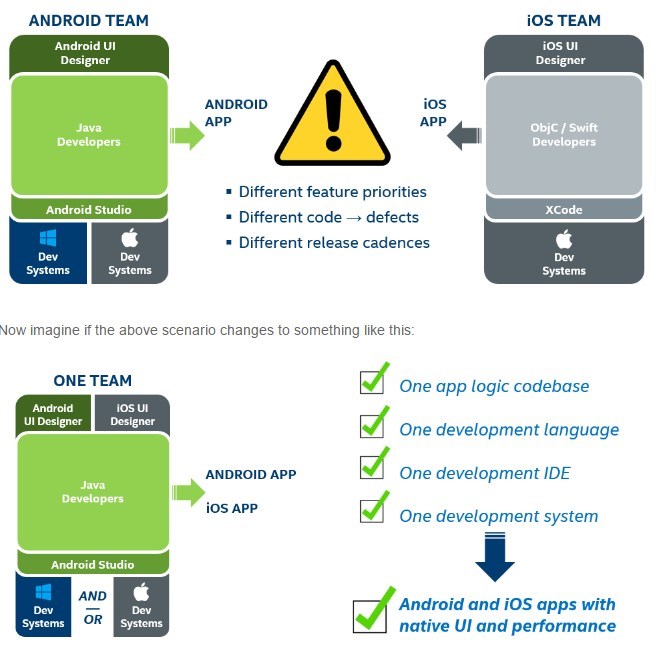
Advantages of Multi-OS engine are great, especially for the developers who do not want to master the Apple programming languages, thus having a direct way to “convert” their applications for iOS. The final code is native to both ARM and x86 processors.
Hence, the Multi-OS Engine handles all the process of creating the code for iOS, ensuring the exchange of the various APIs available for each operating system and the necessary compatibility.
The Multi-OS Engine is now available as a trial version for those who want to use or test it now to convert their applications.
Samsung Galaxy S8 Codenamed ‘Project Dream’ To Feature VR-Ready 4K Display And Dual Camera

As we all know that this is not the first time we hear rumors about the Samsung Galaxy S8. Now it is revealed that the device Samsung Galaxy S8 is codenamed by the Samsung and called internally ‘Project Dream’ as well as once again it is rumored to have a VR-Ready 4K display along with the Dual Camera.Samsung Galaxy S8 Codenamed ‘Project Dream’ To Feature VR-Ready 4K Display And Dual Camera
This is not the first time since we were aware about the rumors about the Samsung Galaxy S8. As it is still early, last month we saw the news that the successor to the Galaxy S7 could be the first smartphone from the company to bring a screen with Ultra HD resolution. Not only that, but this would be the first to debut a new camera from Samsung with the double set of lenses.Now it is revealed that the device Samsung Galaxy S8 is codenamed by the Samsung and called internally ‘Project Dream’. The Samsung Galaxy S7 received the codename ‘Project Lucky’ early in the second half of last year, just about the same time when the development of the device was started. With that in mind, it seems that Samsung has already started working on its next flagship smartphone Samsung Galaxy S8, even if the Samsung Galaxy Note 7 yet or has been made official.According to the sources, it seems that we will not see a very radical change in the design. As if we notice then we can see that the Samsung Galaxy S7 was practically an improved version of the Samsung Galaxy S6 and the same can happen with the Samsung Galaxy S8.In addition to bringing a 4K screen and dual camera, it is said that the chipset to be released on the device will be the Snapdragon 830 that will be exclusively manufactured on 10nm by the Samsung itself, which should help to reduce energy consumption as well as it will also balance the scales with the increase of pixels on the screen.It is expected that the Samsung Galaxy Note 7 will be the first smartphone from the company to carry 6GB of RAM, but everything indicates that this jump in the amount of memory is only for the Galaxy S8. However, it is too early to take seriously any information revealed about the successor of the Samsung Galaxy S7. Anyway, it should not take to begin to emerge leaks on the unit for more reliable sources.
Now Prisma App Is Available To All Android Users Via Google Play Store
Now Prisma App Is Available To All Android Users Via Google Play Store

Many of us might have heard about the very popular photo editing app Prisma, basically it transforms your photos into awesome artworks which is already been quite popular on iOS. But, now it is available to all Android Users via Google Play Store.
Now Prisma App Is Available To All Android Users Via Google Play Store
It’s probably one of the most popular application of the moment, popular Prisma photo-editing app is out of beta and is now available for all Android users via the Google Play Store. The popular Prisma photo-editing app was released yesterday for the Google platform and already has a 4.6 rating (on a scale from 0 to 5).
Now many of you might be thinking that what is the Prisma app actually, basically the Prisma app is a photo-editing app which transforms your photos into artworks using the styles of famous artists: Munk, Picasso as well as world famous ornaments and patterns. A unique combination of neural networks and artificial intelligence helps you turn memorable moments into timeless art”.
So, now it’s time to turn your photos into awesome artworks!!!…
One of the apps Prisma that has great prominence in a state on the App Store. This app is actually created by the Prism Lab, which uses artificial intelligence to apply a wide range of effects (about 36), which allow you to turn any photo into an authentic work of art, using styles of famous artists such as Van Gogh, Picasso, Levitan, etc.
After much anxiety, Prisma Lab finally released the application Prisma for the Android version. As the photo-editing app Prisma was first launched on iOS, hence, quickly gained much popularity and gone viral as well, just because of its hand sketch-like effects.
SwiftKey Walks To Share Data Of Its Users
SwiftKey Walks To Share Data Of Its Users
As we all know that how popular the virtual keyboard app SwiftKey is, as it is available for both Android and iOS which was released by Microsoft earlier this year. But, currently, an information arising now revealed that this keyboard walks to share information of random users with strangers.
As we all know that how popular the virtual keyboard app SwiftKey is, as it is available for both Android and iOS which was released by Microsoft earlier this year. But, currently, an information arising now revealed that this keyboard walks to share information of random users with strangers.
SwiftKey Walks To Share Data Of Its Users
The smartphones keyboards have been adapted over the years and are increasingly customized and tailored to each user individually. One of the most often used keyboard is SwiftKey, which has a presence already on both mobile platforms Android and iOS. An information arising now revealed that this keyboard walks to share information of random users with strangers.
One of the features that users enjoy more in SwiftKey is its ability to synchronize the most commonly used words and phrases and thus propose words when the user needs them.
But according to the information from multiple users, SwiftKey is in trouble in this synchronization and is sharing information from random users. Several users complained that they have been receiving phone numbers and email addresses of other users on proposals for words that SwiftKey features.
There are also many users who complained about receiving proposals for words in different languages of their own, something that is not normal, yes, now many of you might be thinking that what’s wrong happen to SwiftKey. But, currently, the major problem is the user data, which is currently vulnerable.
The problem has been recognized by the SwiftKey, which immediately suspended its synchronization mechanisms, so as to avoid that no more information was wrongly shared and they were not provided proposals in languages that users do not know. The company is now expected to detect and fix the problem as soon as possible.
According to the SwiftKey, this is a problem which should not be affecting the majority of users, which is showing only in some specific cases. However, it was decided to stop synchronizing data to avoid further major problems.
SwiftKey is one of the purchases of Microsoft this year among the several purchases. Just for $250 million the Redmond company pulled itself this keyboard probably to achieve further enhancement to the Windows 10 mobile keyboard as well as also maintaining a strong presence on Android and iOS mobile platforms.
Using VPN In UAE Could Get You In Jail And Fine Of Up To $545000

The President of the United Arab Emirates (UAE), Sheikh Khalifa bin Zayed Al Nahyan, has declared few new national laws which also includes the IT crimes as well. New national law claims that if you are using a VPN to access the blocked sites in the United Arab Emirates then it could land you in prison and fine of up to $545000.
Using VPN In UAE Could Get You In Jail And Fine Of Up To $545000
As we all know that online privacy is one of the most biggest and significant challenges nowadays. Hence, the governments across the world have been found to be utilizing the Internet to pursue people’s information and carry mass surveillance.
Using spoofed IP-addresses for illicit purposes in the United Arab Emirates may entail a penalty of imprisonment or a fine of up to $545000. The relevant changes in the legislation announced by the United Arab Emirates (UAE) President, Sheikh Khalifa bin Zayed Al Nahyan. The penalties can be as limited as $136,000 and as high as $545,000 or else the least option will be the prison.
Yes, many of you might be thinking that what kind of rubbish rule is this, but yes it’s true, as the President of the United Arab Emirates (UAE), Sheikh Khalifa bin Zayed Al Nahyan, has already declared all these national laws which also includes VPN as well.
Note the UAE officially banned or blocked almost all popular foreign applications based on VoIP technology (Viber and WhatsApp), allowing to organize bilateral visual and voice communication users from anywhere in the world.
At the present time to provide telecommunications services in the country, including the protocol VoIP, can only be licensed by the telecom operators. As the public service providers will block all the resources that are contrary to the interests and values of the United Arab Emirates, including all Israeli resources and adult sites as well.
In 2013, the United Arab Emirates (UAE) government officially blocked the access to the Skype service, but in April this year, the ban was lifted after the tech giant Microsoft complaints and other large companies.
Pornhub has been Hacked! Hackers Access Full Database of Pornhub Members
This summary is not available. Please
click here to view the post.
Windows XP support is ending April 8, 2014
 Microsoft first released Windows XP on October 25, 2001. Support for this operating system ended April 8, 2014, which means that they will no longer be providing any updates, patches, or further software security.
If you are still running Windows XP it will continue to work after this date, but if a security vulnerability is discovered after this date it will not be fixed by Microsoft. However, Microsoft will continue to offer anti-malware support (MSE) for Windows XP until July 14, 2015 and other anti-virusdevelopers also announced extending their support up to a year. While this will offer some protection for your computer it still will not protect against any new vulnerabilities not yet released or discovered.
Some people argue that since Windows XP is such an established operating system that it is not likely that any new security vulnerabilities will be discovered. However, most experts recommend upgrading to a later version of Windows, either Windows 7 or the latest version of Windows, Windows 8.
If your computer is over four years old or does not meet the system requirements of a new versions of Windows we suggest getting a new computer with a more up-to-date version of Windows. Alternatively if you want to keep the older computer and don't need Windows you may also consider switching to Linux distro.
Tip: Microsoft is offering a free data transfer program for users upgrading from Windows XP to Windows 7, 8, or 8.1.
Tip: If your hesitation of upgrading Windows is because you have an older program designed for Windows XP, Windows XP Mode can help older programs run in new versions of Windows.
What if I still want to run and use Windows XP?
If you plan on continuing to use Microsoft Windows XP after April 8, 2014 following the below suggestions.
- Don't use an administrator account - Use a limited account and not a adminaccount. If you use an account with not enough rights spyware, malware, and other exploits wont work or be much less likely to work.
- Use an alternative browser - Don't use Internet Explorer and instead use an alternative browser such as Chrome or Firefox, which will continue to be updated and remain secure.
- Keep your browser plugins and extensions updated - Plug-ins like Java andFlash are one of the most common methods of attacking a computer. Keep your browser and all of its plug-ins up-to-date. You can find the latest version of all your plug-ins through our system information tool. If you don't use a plug-in that is installed (e.g. Java, uninstall it from the computer.)
- Keep the computer offline - If this is a work computer that doesn't need to be online keep it offline. Without having access to the Internet the computer cannot be attacked.
- Follow all the steps on how to protect yourself while online.
Related questions
Can Windows XP still be installed and activated after April 8, 2014?
Yes. You'll still be able to run, install, and activate Windows XP after April 8, 2014.
What about Windows XP Embedded?
Windows XP Embedded support will remain until January 12, 2016.
Subscribe to:
Posts (Atom)