
Lets have a look on the great ways that will help you to control your android phone without using the hardware buttons with the help of apps that will let you to do that, so follow the guide stated below to proceed.ow-a-days there is a trend where mostly all the smartphones are now controlled with their touch screen, but apart from its almost every control being handled from the touch screen only there are some buttons too on the device that provide control over some of the functions which either are the limitations of the touch screen. There are some smartphones that have only volume rockers and power/lock button but fairly amount of devices do process more number of buttons.Now in case if you have either your device’s buttons broken or you have any problem with them then you won’t be able to access their functions. Here in this article we will tell you about the method through which you can control the every function of your Android device directly through the touch screen and there will be no need left for the Hardware Buttons.
How to Control an Android Device without any Hardware Buttons
For this method, you have to use some applications that will make the usage of on screen space to make up the place for some icons which when tapped or touched resembles the action like that of any hardware button that was decided before in these apps.Apps to Control an Android Device Without Any Hardware Buttons
#1 Using Button Savior App

#2 Using DTSO app
This is the another good app like Button savior app but this performs somewhat differently and has it’s limitations for only locking and unlocking the screen. You can set this app to lock or unlock your device screen by using some of the sensor related gestures or on screen touch movements and in all that you can easily fully remove the need of the lock screen hardware button of your device.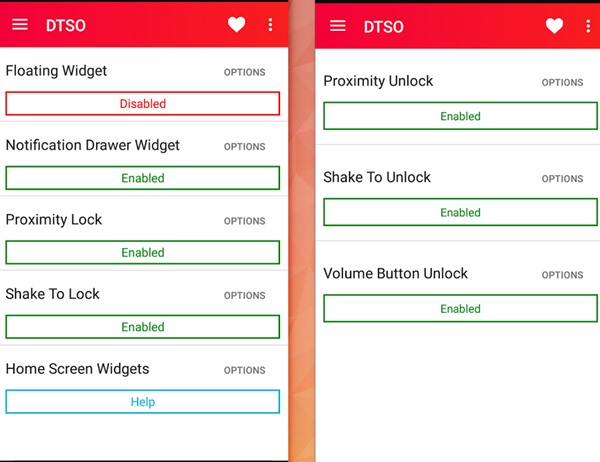
This is indeed a great method by which you can easily deduce the need of the hardware buttons of the Android smartphone device and simply do all these functions directly using the touch screen of the device. Just install some of the amazing apps discussed in the article and you will not need to do anything more advance and after that you can easily put on your dedicated hardware button actions on your screen.


No comments:
Post a Comment